
Gameplay
Rhythm Heaven Groove first-startup TV calibration walkthrough
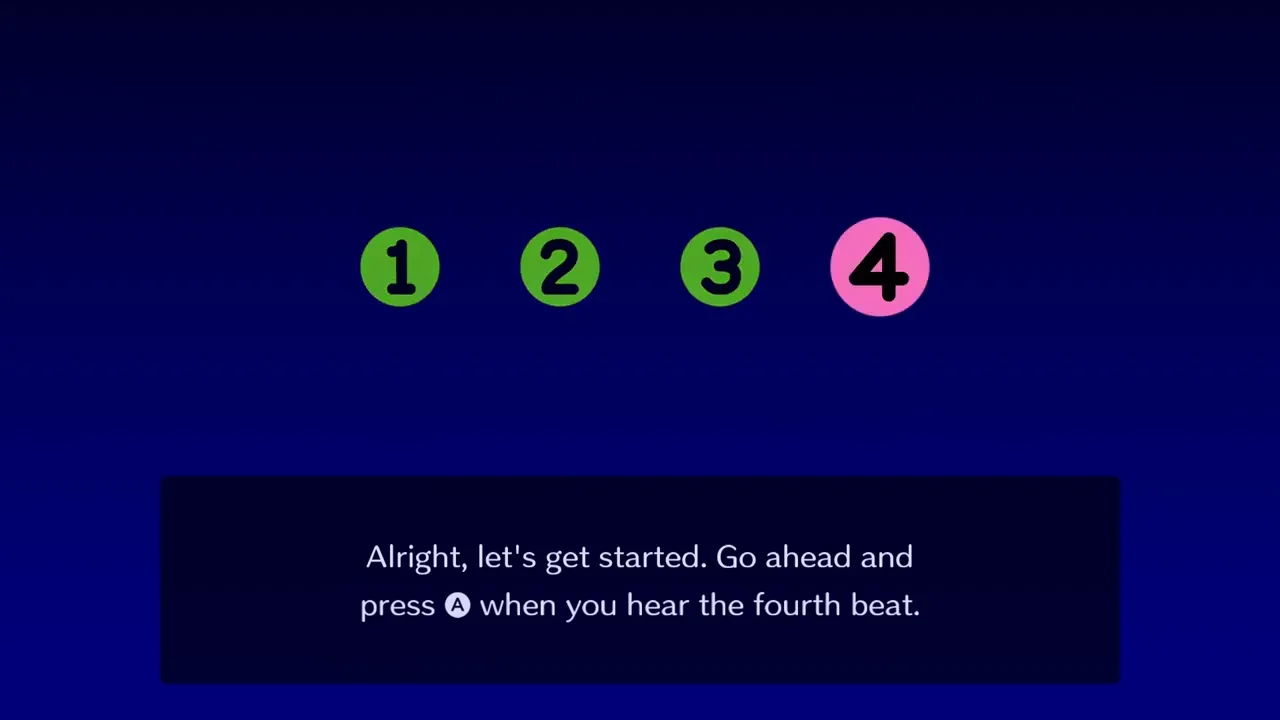
See the Rhythm Heaven Groove TV input delay test from first launch — press A on the fourth beat to sync audio and video.
Gameplay
See the Rhythm Heaven Groove TV input delay test from first launch — press A on the fourth beat to sync audio and video.
Rhythm Heaven Groove scores every button press against the music beat. On a television, picture processing adds input delay — your timing feels early or late even when you react correctly. Handheld play on the Switch screen avoids most of that delay, which is why many players learn stages portably first.
Both the Starter Demo and full Rhythm Heaven Groove release include a TV input delay rhythm test during first setup. The narrator explicitly warns that TVs can introduce "funky delay" that ruins rhythm gaming. Skipping or ignoring calibration is the most common reason new Rhythm Heaven Groove players miss beats on a display but play fine in handheld mode.
Calibration matters most for Perfect Challenges and strict minigames like Disc Dog. Even Good ranks become frustrating when audio and button reads disagree. Pair this guide with the Perfect guide once your offset feels correct.
On first launch, Rhythm Heaven Groove walks you through read-aloud settings, then starts the TV input delay test. The narrator asks you to press A when you hear the fourth beat of a repeating count-in: "One, two, three, four." The game repeats the pattern several times to measure your display latency.
Listen to the audio, not the on-screen numbers. Tap A on beat four each cycle until the test completes and the narrator confirms you are set. You can reopen this test later from the title menu under TV input delay settings if you change TVs or notice drift mid-session.
After calibration, Rhythm Heaven Groove may warn that adjustment can cause odd feedback — you might hear a success sound when you actually failed. That quirk is most common on TV. The game notes it should not happen in handheld mode, so switch portable if feedback feels wrong after calibrating.
Before opening Rhythm Heaven Groove, configure your display for the lowest latency. Game Mode (or PC Mode on some sets) disables motion smoothing that adds tens of milliseconds of delay. Turn off extra processing like dynamic contrast or film mode while playing Rhythm Heaven Groove.
Use a wired Pro Controller or Joy-Con grip when possible. Wireless controllers can add small lag on top of TV delay. If you must play wireless, stay close to the console and avoid crowded 2.4 GHz environments.
The Rhythm Heaven Groove demo opening also warns that wireless earphones can desync audio from video. Prefer wired headphones plugged into the Switch or controller jack when judging beats on TV.
| Setting | Action | Tag |
|---|---|---|
| TV picture mode | Enable Game Mode / PC Mode | Display |
| Motion smoothing | Disable for rhythm play | Display |
| Controller | Wired Pro Controller preferred | Input |
| Audio | Wired headphones over Bluetooth | Audio |
Matched by build plan, shared topics, and guide progression — not random related links.
Perfect Challenge rules, three-try limits, and Set 1 timing tips.
Good clears unlock Perfect Challenges — read timing rules before grinding
All Rhythm Heaven Groove guides — demo through calibration.
Fits your foundations path — Guides hub is the logical next slot
Re-run Rhythm Heaven Groove TV calibration whenever timing suddenly feels off. Common triggers: switching HDMI ports, changing TV picture presets, moving from handheld back to the dock, or using a different soundbar with its own delay.
Some reviewers note certain TVs still feel sluggish after calibration — if Good ranks vanish on TV but return in handheld, trust portable play for learning and retry TV after adjusting hardware. Rhythm Heaven Groove acknowledges each TV behaves differently.
After recalibrating, test Hoop Trundling or another Set 1 stage with simple beats. If jumps still feel late, nudge your habit earlier or later for one song before repeating the full test.
Handheld mode on Nintendo Switch or Switch 2 keeps screen, controller, and audio in one unit — the lowest-latency way to play Rhythm Heaven Groove. Many Perfect hunters stay handheld for challenge attempts.
Docked TV play needs calibration but enables multiplayer on a couch screen. Recalibrate when returning from portable sessions so Rhythm Heaven Groove does not keep an offset tuned for the built-in display.
Nintendo lists Rhythm Heaven Groove as Switch 2 compatible with consistent behavior. Calibration steps are identical; use the same Game Mode and wired-audio advice on external displays.
| Mode | Latency | Best for |
|---|---|---|
| Handheld | Lowest | Learning, Perfect attempts |
| TV + calibrated | Medium | Multiplayer, big screen |
| TV + Game Mode off | High | Avoid for Rhythm Heaven Groove |
If Rhythm Heaven Groove still feels unplayable on TV after calibration, work through hardware before adjusting play style. Confirm Game Mode is active, swap to wired audio, and test handheld on the same stage. Persistent TV-only failure usually means display lag exceeds what the offset can fix — prioritize handheld for ranked play.
When success sounds play on misses, the game itself flags miscalibration. Re-run the fourth-beat test or switch handheld. Bluetooth headphones plus TV processing stack delays and break Perfect windows.
Link timing issues on specific stages to the beginner guide for ear-first technique — calibration fixes global lag, not pattern learning.
Handheld usually needs less correction, but wireless controllers or odd audio setups can still benefit from checking settings. TV players should always run the built-in test.
From the title menu, open TV input delay settings and repeat the fourth-beat A press test.
Likely input or audio lag. Enable Game Mode, use wired headphones, run calibration, or switch handheld to compare.
Yes — demo save data including settings transfers to the full release on the same console.
It removes systemic lag so Perfect attempts are possible. You still need pattern knowledge from the Perfect guide.
Matched by build plan, shared topics, and guide progression — not random related links.
Rankings, sets, listening tips, and first-week goals on Switch.
Fits your foundations path — Beginner guide is the logical next slot
Hardest and best rhythm games ranked from demo Set 1 through launch.
Once basics click, browse all sets on the rhythm games list
Check off rhythm games, Perfect scores, and medals locally.
Progress tracker pairs with beginner goals for first-week milestones